---
title: "Using IceGrid Deployment"
url: https://docs.zeroc.com/ice/3.8/services/icegrid/using-icegrid-deployment
docs_index: https://docs.zeroc.com/llms.txt
---
> For an index of every page, see [llms.txt](https://docs.zeroc.com/llms.txt).
# Using IceGrid Deployment
Here we extend the capabilities of our [sample application](https://docs.zeroc.com/ice/3.8/services/icegrid/getting-started-with-icegrid.md) using IceGrid's deployment facility.
## Ripper Architecture Using Deployment
The revised architecture for our application consists of a single IceGrid node responsible for our encoding server that runs on the computer named `ComputeServer`. The illustration below shows the client's initial invocation on its indirect proxy and the actions that IceGrid takes to make this invocation possible:
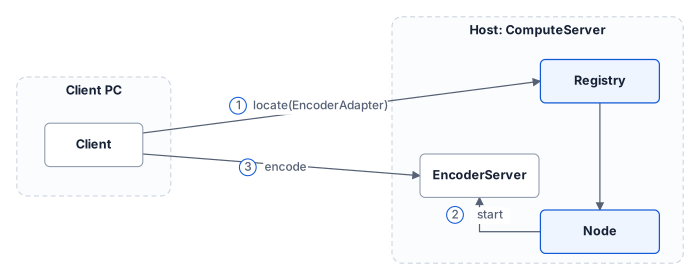
Architecture for deployed ripper application
In contrast to the [initial architecture](https://docs.zeroc.com/ice/3.8/services/icegrid/getting-started-with-icegrid.md), we no longer need to manually start our server. In this revised application, the client's locate request prompts the registry to query the node about the server's state and start it if necessary. Once the server starts successfully, the locate request completes and subsequent client communication occurs directly with the server.
## Ripper Deployment Descriptors
We can deploy our application using the [icegridadmin command line utility](https://docs.zeroc.com/ice/3.8/services/icegrid/icegridadmin-command-line-tool.md), but first we must define our descriptors in XML. The descriptors are quite brief:
```xml
```
For IceGrid's purposes, we have named our application `Ripper`. It consists of a single server, `EncoderServer`, assigned to the node `Node1`.
> **Note**
>
> Since a computer typically runs only one node process, you might be tempted to give the node a name that identifies its host (such as `ComputeServerNode`). However, this naming convention becomes problematic as soon as you need to migrate the node to another host.
The server's `exe` attribute supplies the pathname of its executable, and the `activation` attribute indicates that the server should be [activated on demand](https://docs.zeroc.com/ice/3.8/services/icegrid/icegrid-server-activation.md) when necessary.
The object adapter's descriptor is the most interesting. As you can see, the `name` and `id` attributes both specify the value `EncoderAdapter`. The value of `name` reflects the adapter's name in the server process (i.e., the argument passed to [createObjectAdapter](https://docs.zeroc.com/ice/3.8/runtime/dispatch/creating-an-object-adapter.md)) that is used for configuration purposes, whereas the value of `id` uniquely identifies the adapter within the registry and is used in indirect proxies. These attributes are not required to have the same value. Had we omitted the `id` attribute, IceGrid would have composed a unique value by combining the server name and adapter name to produce the following identifier:
```text
EncoderServer.EncoderAdapter
```
The `endpoints` attribute defines one or more [endpoints](https://docs.zeroc.com/ice/3.8/runtime/dispatch/object-adapter-endpoints.md) for the adapter. As explained [earlier](https://docs.zeroc.com/ice/3.8/services/icegrid/getting-started-with-icegrid.md), these endpoints do not require a fixed port.
Refer to the [XML reference](https://docs.zeroc.com/ice/3.8/services/icegrid/icegrid-xml-reference.md) for detailed information on using XML to define descriptors.
## Ripper Registry and Node Configuration
In our [initial registry configuration](https://docs.zeroc.com/ice/3.8/services/icegrid/getting-started-with-icegrid.md), we created the directory `/opt/ripper/registry` for use by the registry, and the registry configuration file `/opt/ripper/registry.cfg`. The registry and the node run in separate processes, each with its own configuration file.
We remove one property from `/opt/ripper/registry.cfg`: [IceGrid.Registry.DynamicRegistration](https://docs.zeroc.com/ice/3.8/property-reference/icegrid-properties.md#icegrid.registry.dynamicregistration). Without this property, the registry rejects the registration of object adapters that have not been deployed. The file now contains the following properties:
```config
IceGrid.Registry.Client.Endpoints=tcp -p 4061
IceGrid.Registry.Server.Endpoints=tcp
IceGrid.Registry.Internal.Endpoints=tcp
IceGrid.Registry.AdminPermissionsVerifier=IceGrid/NullPermissionsVerifier
IceGrid.Registry.LMDB.Path=/opt/ripper/registry
```
The node needs a data directory, and we use `/opt/ripper/node`. This directory must exist before starting the node. The node's configuration file, `/opt/ripper/node.cfg`, contains the following properties:
```config
IceGrid.Node.Endpoints=tcp
IceGrid.Node.Name=Node1
IceGrid.Node.Data=/opt/ripper/node
Ice.Default.Locator=IceGrid/Locator:tcp -p 4061
```
The node properties are explained below:
- [IceGrid.Node.Endpoints](https://docs.zeroc.com/ice/3.8/property-reference/icegrid-properties.md) This property specifies the node's endpoints. A fixed port is not required.
- [IceGrid.Node.Name](https://docs.zeroc.com/ice/3.8/property-reference/icegrid-properties.md#icegrid.node.name) This property defines the unique name for this node. Its value must match the descriptor we wrote above.
- [IceGrid.Node.Data](https://docs.zeroc.com/ice/3.8/property-reference/icegrid-properties.md#icegrid.node.data) This property specifies the node's data directory.
- [Ice.Default.Locator](https://docs.zeroc.com/ice/3.8/property-reference/ice-default-properties.md#ice.default.locator) The node uses this property to reach the registry, and so does the [icegridadmin](https://docs.zeroc.com/ice/3.8/services/icegrid/icegridadmin-command-line-tool.md) tool when we start it with this configuration file. Refer to our discussion of the [ripper client configuration](https://docs.zeroc.com/ice/3.8/services/icegrid/getting-started-with-icegrid.md) for more information on this setting.
## Ripper Server Configuration Using Deployment
Server configuration is accomplished using descriptors. During deployment, the node creates a subdirectory tree for each server. Inside this tree the node creates a configuration file containing properties derived from the server's descriptors. For instance, the adapter's [descriptor](#ripper-deployment-descriptors) generates the following properties in the server's configuration file:
```config
# Server configuration
Ice.Admin.ServerId=EncoderServer
Ice.Admin.Endpoints=tcp -h 127.0.0.1
Ice.ProgramName=EncoderServer
# Object adapter EncoderAdapter
EncoderAdapter.Endpoints=tcp
EncoderAdapter.AdapterId=EncoderAdapter
Ice.Default.Locator=IceGrid/Locator:default -p 4061
```
As you can see, the configuration file that IceGrid generates from the descriptor resembles the [initial configuration](https://docs.zeroc.com/ice/3.8/services/icegrid/getting-started-with-icegrid.md), with two additional properties:
- [Ice.Admin.ServerId](https://docs.zeroc.com/ice/3.8/property-reference/ice-admin-properties.md#ice.admin.serverid)
- [Ice.Admin.Endpoints](https://docs.zeroc.com/ice/3.8/property-reference/ice-admin-properties.md)
The `Ice.Admin.Endpoints` property enables the [administrative facility](https://docs.zeroc.com/ice/3.8/services/icegrid/icegrid-and-the-administrative-facility.md) that, among other features, allows an IceGrid node to gracefully deactivate the server.
Using the directory structure we established for our ripper application, the configuration file for `EncoderServer` has the file name shown below:
```text
/opt/ripper/node/servers/EncoderServer/config/config
```
Note that this file should not be edited directly because any changes you make are lost the next time the node regenerates the file. The correct way to add properties to the file is to include property definitions in the server's descriptor. For example, we can add the property `Ice.Trace.Network=1` by modifying the server descriptor as follows:
```xml
```
When a node activates a server, it passes the location of the server's configuration file using the [--Ice.Config](https://docs.zeroc.com/ice/3.8/property-reference/ice-properties.md#ice.config) command-line argument. If you start a server manually from a command prompt, you must supply this argument yourself.
## Starting the Registry and Node for the Ripper Application
Now that the configuration files are written and the directory structure is prepared, we start the IceGrid registry:
```shell
icegridregistry --Ice.Config=/opt/ripper/registry.cfg
```
Then, in another terminal, we start the node:
```shell
icegridnode --Ice.Config=/opt/ripper/node.cfg
```
See [icegridregistry](https://docs.zeroc.com/ice/3.8/services/icegrid/icegrid-server-reference/icegridregistry.md) and [icegridnode](https://docs.zeroc.com/ice/3.8/services/icegrid/icegrid-server-reference/icegridnode.md) for their command line options.
## Deploying the Ripper Application
With the registry up and running, it is now time to deploy our application. Like our client, the `icegridadmin` utility also requires a definition for the [Ice.Default.Locator](https://docs.zeroc.com/ice/3.8/property-reference/ice-default-properties.md#ice.default.locator) property. We can start the utility with the following command:
```shell
icegridadmin --Ice.Config=/opt/ripper/node.cfg
```
After confirming that it can contact the registry, `icegridadmin` provides a command prompt at which we deploy our application. Assuming our descriptor is stored in `/opt/ripper/app.xml`, the deployment command is shown below:
```shell
>>> application add "/opt/ripper/app.xml"
```
Next, confirm that the application has been deployed:
```shell
>>> application list
Ripper
```
You can start the server using this command:
```shell
>>> server start EncoderServer
```
Finally, you can retrieve the current endpoints of the object adapter:
```shell
>>> adapter endpoints EncoderAdapter
```
If you want to experiment further using `icegridadmin`, issue the `help` command and review the [available commands](https://docs.zeroc.com/ice/3.8/services/icegrid/icegridadmin-command-line-tool.md).
## Ripper Progress Review
We have deployed our first IceGrid application, but you might be questioning whether it was worth the effort. Even at this early stage, we have already gained several benefits:
- We no longer need to manually start the encoder server before starting the client, because the IceGrid node automatically starts it if it is not active at the time a client needs it. If the server happens to terminate for any reason, such as an IceGrid administrative action or a server programming error, the node starts it again the next time a client needs it, without intervention on our part.
- We can manage the application remotely using one of the IceGrid administration tools. The ability to remotely modify applications, start and stop servers, and inspect every aspect of your configuration is a significant advantage.
Admittedly, we have not made much progress yet in our stated goal of improving the performance of the ripper over alternative solutions that are restricted to running on a single computer. Our client now has the ability to easily delegate the encoding task to a server running on another computer, but we have not achieved the parallelism that we really need. For example, if the client created a number of encoders and used them simultaneously from multiple threads, the encoding performance might actually be *worse* than simply encoding the data directly in the client, as the remote computer would likely slow to a crawl while attempting to task-switch among a number of processor-intensive tasks.
## Adding Nodes to the Ripper Application
Adding more nodes to our environment would allow us to distribute the encoding load to more compute servers. Using the techniques we have learned so far, let us investigate the impact that adding a node would have on our descriptors, configuration, and client application.
### Descriptor Changes
The addition of a node is mainly an exercise in cut and paste:
```xml
```
Note that we now have two `node` elements instead of a single one. You might be tempted to simply use the host name as the node name. However, in general, that is not a good idea. For example, you may want to run several IceGrid nodes on a single machine (for example, for testing). Similarly, you may have to rename a host at some point, or need to migrate a node to a different host. But, unless you also rename the node, that leads to the situation where you have a node with the name of a (possibly obsolete) host when the node in fact is not running on that host. Obviously, this makes for a confusing configuration — it is better to use abstract node names, such as `Node1`.
Aside from the new `node` element, notice that the server identifiers must be unique. The adapter name, however, can remain as `EncoderAdapter` because this name is used only for local purposes within the server process. In fact, using a different name for each adapter would actually complicate the server implementation, since it would somehow need to discover the name it should use when creating the adapter.
We have also removed the `id` attribute from our adapter descriptors; the [default values](https://docs.zeroc.com/ice/3.8/services/icegrid/icegrid-xml-reference/adapter-descriptor-element.md) supplied by IceGrid are sufficient for our purposes.
### Configuration Changes
`Node2` needs its own configuration file, with a different value for [IceGrid.Node.Name](https://docs.zeroc.com/ice/3.8/property-reference/icegrid-properties.md#icegrid.node.name):
```config
IceGrid.Node.Endpoints=tcp
IceGrid.Node.Name=Node2
IceGrid.Node.Data=/opt/ripper/node
Ice.Default.Locator=IceGrid/Locator:tcp -h registryhost -p 4061
```
We assume that `/opt/ripper/node` refers to a local file system directory on the computer hosting `Node2`, and not a shared volume, because two nodes must not share the same data directory.
We have also modified the locator proxy to include the address of the host on which the registry is running.
> **Tip**
>
> Using [IceLocatorDiscovery](https://docs.zeroc.com/ice/3.8/plugins/icelocatordiscovery.md) allows a node to discover its registry at run time without the need to define `Ice.Default.Locator`.
### Redeploying the Application
After saving the new descriptors, you need to redeploy the application. Using `icegridadmin`, issue the following command:
```shell
icegridadmin --Ice.Config=/opt/ripper/node.cfg
>>> application update "/opt/ripper/app.xml"
```
If an update changes the configuration of a running server, IceGrid stops the server before applying the update; a change to descriptions or to well-known or allocatable objects leaves the server running. After the update, the node restarts the servers with the `always` activation mode and starts the other enabled servers on demand, as usual. We can determine whether an update would require any restarts using the `application diff` command:
```shell
icegridadmin --Ice.Config=/opt/ripper/node.cfg
>>> application diff --servers "/opt/ripper/app.xml"
```
To ensure that our update does not impact any active servers, we can use the `--no-restart` option:
```shell
icegridadmin --Ice.Config=/opt/ripper/node.cfg
>>> application update --no-restart "/opt/ripper/app.xml"
```
With this option, IceGrid accepts an update only if its changes to existing servers are limited to their configuration properties, and it rejects the removal of a running server.
### Client Changes
We have added a new node, but we still need to modify our client to take advantage of it. As it stands now, our client can delegate an encoding task to one of the two `MP3EncoderFactory` objects. The client selects a factory by using the appropriate indirect proxy:
- `factory@EncoderServer1.EncoderAdapter`
- `factory@EncoderServer2.EncoderAdapter`
In order to distribute the tasks among both factories, the client could use a random number generator to decide which factory receives the next task:
```cpp
string adapter;
if((rand() % 2) == 0)
{
adapter = "EncoderServer1.EncoderAdapter";
}
else
{
adapter = "EncoderServer2.EncoderAdapter";
}
Ripper::MP3EncoderFactoryPrx factory{communicator, "factory@" + adapter};
auto encoder = factory.createEncoder();
```
There are a few disadvantages in this design:
- The client application must be modified each time a new server is added or removed because it knows all of the adapter IDs.
- The client cannot distribute the load intelligently; it is just as likely to assign a task to a heavily-loaded computer as it is an idle one.
We describe better solutions in the sections that follow.
## See Also
- [IceGrid Server Activation](https://docs.zeroc.com/ice/3.8/services/icegrid/icegrid-server-activation.md)
- [Creating an Object Adapter](https://docs.zeroc.com/ice/3.8/runtime/dispatch/creating-an-object-adapter.md)
- [Object Adapter Endpoints](https://docs.zeroc.com/ice/3.8/runtime/dispatch/object-adapter-endpoints.md)
- [Getting Started with IceGrid](https://docs.zeroc.com/ice/3.8/services/icegrid/getting-started-with-icegrid.md)
- [icegridadmin Command Line Tool](https://docs.zeroc.com/ice/3.8/services/icegrid/icegridadmin-command-line-tool.md)
- [IceGrid and the Administrative Facility](https://docs.zeroc.com/ice/3.8/services/icegrid/icegrid-and-the-administrative-facility.md)
- [icegridnode](https://docs.zeroc.com/ice/3.8/services/icegrid/icegrid-server-reference/icegridnode.md)
- [Adapter Descriptor Element](https://docs.zeroc.com/ice/3.8/services/icegrid/icegrid-xml-reference/adapter-descriptor-element.md)
- [IceGrid.\*](https://docs.zeroc.com/ice/3.8/property-reference/icegrid-properties.md)