IceGrid and Glacier2 Integration
3 min read
3 min read
3 min read
3 min read
3 min read
3 min read
3 min read
3 min read
3 min read
IceGrid is a server activation and location service. This section describes the ways in which you can integrate Glacier2 and IceGrid.
Configuring Router Clients for IceGrid
It is not uncommon for a Glacier2 client to require access to a locator service such as IceGrid. In the absence of Glacier2, a locator client would typically define the property Ice.Default.Locator with a stringified proxy for the locator service. However, when that locator service is accessed via a Glacier2 router, the configuration requirements are slightly different. It is no longer necessary for the client's configuration to include Ice.Default.Locator; this property must be defined in the router's configuration instead.
For example, consider the following network architecture:
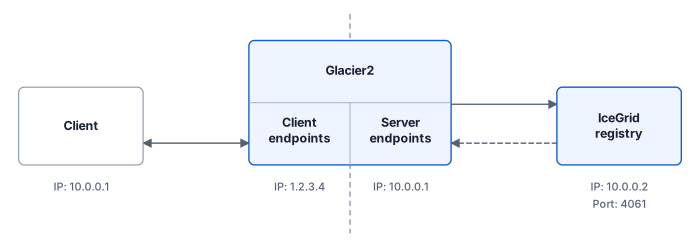
In this case the Glacier2 router's configuration must include the property shown below:
Ice.Default.Locator=IceGrid/Locator:tcp -h 10.0.0.2 -p 4061Using Replicated Session Managers
An IceGrid application might want to use replication to increase the availability of Glacier2 session managers. When you configure an indirect proxy for a session manager (and configure Glacier2 with a locator proxy), the Ice runtime in the router queries the locator to obtain a proxy for a session manager replica.
By default, this proxy is cached for 10 minutes, meaning the router uses the same session manager proxy to create sessions for a 10-minute period, after which it queries the locator again. If you want to distribute the session-creation load among the session manager replicas more evenly, you can decrease the locator cache timeout using configuration properties.
For example, the following settings use a timeout of 30 seconds:
Glacier2.SessionManager.LocatorCacheTimeout=30Glacier2.SSLSessionManager.LocatorCacheTimeout=30As you can see, timeouts are specified individually for the SessionManager and SSLSessionManager proxies. You can also disable caching completely by using a value of 0, in which case the router queries the locator before every invocation on a session manager. See the discussion of session management for more details.