Variables in IceGrid Descriptors
7 min read
7 min read
7 min read
7 min read
7 min read
7 min read
7 min read
7 min read
7 min read
Variables allow you to define commonly-used information once and refer to them symbolically throughout your application descriptors.
Syntax
Substitution for a variable or parameter VP is attempted whenever the symbol ${VP} is encountered, subject to the limitations and rules described below. Substitution is case-sensitive, and a fatal error occurs if VP is not defined when the application is saved to an IceGrid registry.
Where Are Variables Allowed?
Substitution is performed in all string fields except the following:
- server and service template IDs (when defining a template or when referring to a template)
- variable names
- template parameter names
- node names
- application names
Escaping a Variable
You can prevent substitution by escaping a variable reference with an additional leading $ character. For example, in order to assign the literal string ${abc} to a variable, you would use $${abc} as this variable's value.
The extra $ symbol is only meaningful when immediately preceding a variable reference, therefore text such as US$$55 is not modified. Each occurrence of the characters $$ preceding a variable reference is replaced with a single $ character, and that character does not initiate a variable reference.
Pre-Defined Variables
IceGrid defines a set of read-only variables to hold information that may be of use to descriptors. The names of these variables are reserved and cannot be used as variable or parameter names. The table below describes the purpose of each variable and defines the context in which it is valid.
| Name | Description |
|---|---|
application | The name of the enclosing application. |
node | The name of the enclosing node. |
node.os | The name of the enclosing node operating system. On Unix, this is value is provided by uname. On Windows, the value is Windows. |
node.hostname | The host name of the enclosing node. |
node.release | The operation system release of the enclosing node. On Unix, this value is provided by uname. On Windows, the value is obtained from the OSVERSIONINFO data structure. |
node.version | The operation system version of the enclosing node. On Unix, this value is provided by uname. On Windows, the value represents the current service pack level. |
node.machine | The machine hardware name of the enclosing node. On Unix, this value is provided by uname. On Windows, the value is x86 or x64. |
node.datadir | The absolute pathname of the enclosing node data directory. |
server | The ID of the enclosing server. |
service | The name of the enclosing service. |
session.id | The client session identifier. For sessions created with a user name and password, the value is the user ID; for sessions created from a secure connection, the value is the distinguished name associated with the connection. |
The availability of a variable is easily determined in some cases, but may not be readily apparent in others. For example, you can use the ${node} variable in a property value within a server template definition, because variables in the body of a server template are evaluated when the server template is instantiated on a specific node.
Variable Substitution in IceGrid GUI
In a number of panes, you can substitute variables and template parameters by their respective value. Use View > Show Variables and View > Substitute Variables or the corresponding toolbar toggle buttons:

When variable-substitution is enabled, the descriptors are displayed read-only.
Scoping Rules
Descriptors may only define variables at the application and node levels. Each node introduces a new scope, such that defining a variable at the node level overrides (but does not modify) the value of an application variable with the same name. Similarly, a template parameter overrides the value of a variable with the same name in an enclosing scope. A descriptor may refer to a variable defined in any enclosing scope, but its value is determined by the nearest scope. The diagram below illustrates these concepts:
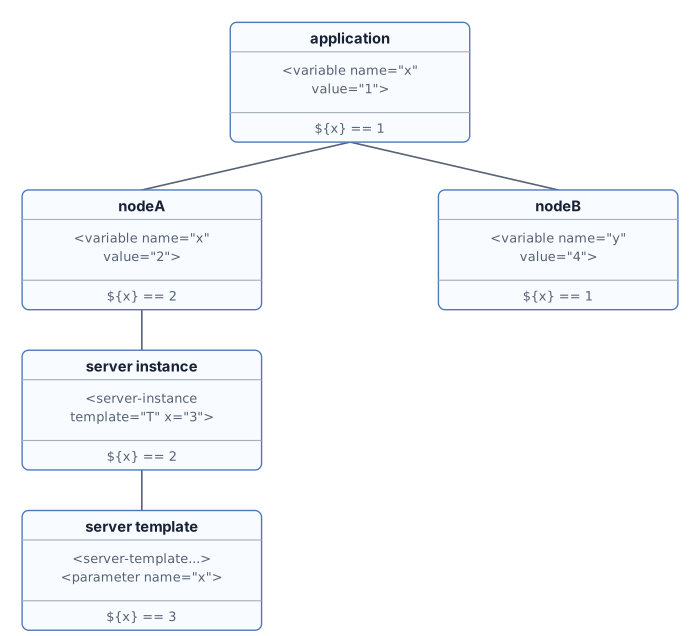
In this diagram, the variable x is defined at the application level with the value 1. In node A, x is overridden with the value 2, whereas x remains unchanged in node B. Within the context of node A, x continues to have the value 2 in a server instance definition. However, when x is used as the name of a template parameter, the node's definition of x is overridden and x has the value 3 in the template's scope.
Resolving a Reference
To resolve a variable reference ${var}, IceGrid searches for a definition of var using the following order of precedence:
- Pre-defined variables
- Template parameters, if applicable
- Node variables, if applicable
- Application variables
After the initial substitution, any remaining references are resolved recursively using the following order of precedence:
- Pre-defined variables
- Node variables, if applicable
- Application variables
- Template Parameters
Template parameters are not visible in nested template instances. This situation can only occur when an IceBox server template instantiates a service template.
Modifying a Variable
A variable definition can be overridden in an inner scope, but the inner definition does not modify the outer variable.