Node Runtime Component
3 min read
3 min read
3 min read
3 min read
3 min read
3 min read
3 min read
3 min read
3 min read
A node represents an IceGrid node process registered with the IceGrid registry.
States
A node can be either up  or down
  . A "down" node is shown only when it is described by an application deployed on this IceGrid registry.
Actions
A node provides the following actions, from its contextual menu and from the Tools > Node menu:
- Retrieve Ice log Retrieve the log messages sent to the IceGrid node's logger into an Ice Log Dialog. The Ice Log Dialog attaches a remote logger to the node's logger.
- Retrieve stdout Retrieve the IceGrid node's stdout into a Log File Dialog. This retrieval succeeds only when the node's stdout output has been redirected to a file using the Ice.StdOut property.
- Retrieve stderr Retrieve the IceGrid node's stderr into a Log File Dialog. This retrieval succeeds only when the node's stderr output has been redirected to a file using the Ice.StdErr property
- Shutdown Shutdown the IceGrid node process.
Properties
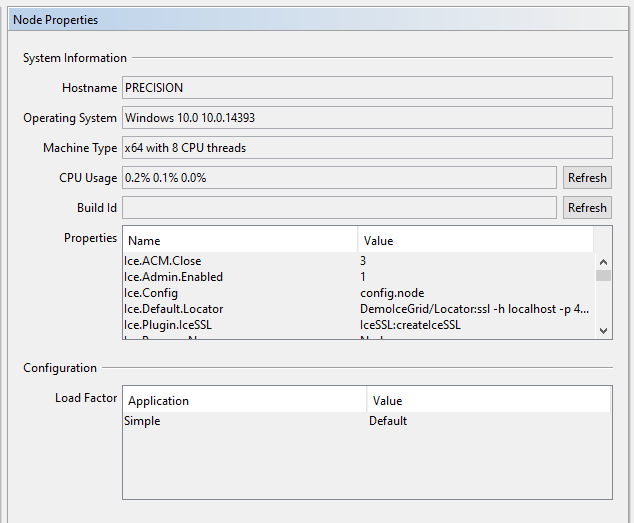
The Node Properties panel shows:
- Hostname The name of the host on which the IceGrid node process is running.
- Operating System The operating system name and version of the host on which the IceGrid node process is running.
- Machine Type The type of CPUs and the number of CPU threads of the host on which the IceGrid node process is running. For example, a computer with a dual-core CPU and 2 "hyper threads" per core will show 4 CPU threads.
- CPU Usage (Windows) or Load Average (Linux/Unix) On Windows, shows the percentage of CPU utilization in the past 1, 5, and 15 minutes. On Linux/Unix, shows the load-average in the past 1, 5 and 15 minutes. These values are retrieved when the Node Properties panel is displayed. Click on the Refresh button to retrieve the latest values.
- Build Id The build Id of this node: this corresponds to the Ice property BuildId.
- Properties A table showing all the Ice properties currently set in this IceGrid node.
- Load Factor Shows the load factor defined by each application using this node.
Children
An IceGrid node can only have the following types of children: