Registry Runtime Component
3 min read
3 min read
3 min read
3 min read
3 min read
3 min read
3 min read
3 min read
3 min read
The registry is the root node of the Runtime Components tree, and represents the IceGrid registry process administered by IceGrid GUI.
Actions
A registry provides the following actions, from its contextual menu and from the Tools > Registry menu:
- Add Well-Known Object Create a new dynamic well-known object in the IceGrid registry.
- Retrieve Ice log Retrieve the log messages sent to the IceGrid registry's logger into an Ice Log Dialog. The Ice Log Dialog attaches a remote logger to the registry's logger.
- Retrieve stdout Retrieve the IceGrid registry's stdout into a Log File Dialog. This retrieval succeeds only when the registry's stdout output has been redirected to a file using the Ice.StdOut property.
- Retrieve stderr Retrieve the IceGrid registry's stderr into a Log File Dialog. This retrieval succeeds only when the registry's stderr output has been redirected to a file using the Ice.StdErr property.
- Shutdown Shutdown the registry process.
Properties
The Registry Properties panel shows:
- Hostname The name of the host on which the IceGrid registry process is running.
- Build Id The build Id of this registry: this corresponds to the Ice property BuildId.
- Properties A table showing all the Ice properties currently set in this registry.
- Deployed Applications

This table shows all the applications deployed on this IceGrid registry, along with the date and time of the last update of each application. A contextual menu allows you to:
open the corresponding application descriptor
show additional details on this application in this registry
remove (undeploy) the application from the registry
Dynamic Well-Known Objects
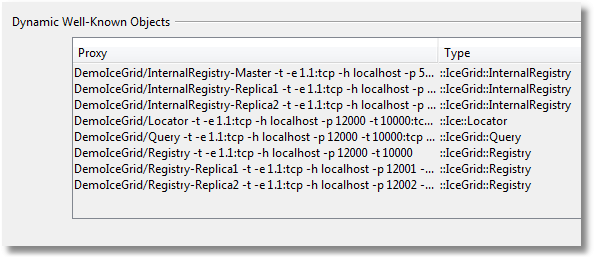
This table shows the well-known objects registry dynamically with the IceGrid registry: well-known objects defined using adapter and replica-group definitions are not included. A contextual menu allows you to add or remove entries from this table, and to show a given entry in its own dialog.
- Dynamic Object Adapters
This table shows the object adapters registered dynamically with the registry. It is typically empty. A registry allows dynamically registered adapters only when its IceGrid.Registry.DynamicRegistration property is set to a value greater than 0. A contextual menu allows you to remove entries from this table.
Note that application filtering does not affect this panel: all applications, well-known objects and dynamic object adapters are always displayed.
Children
A registry node can have the following types of children: