Node Runtime Component
4 min read
4 min read
4 min read
4 min read
4 min read
4 min read
4 min read
4 min read
4 min read
A node represents an IceGrid node process registered with the IceGrid registry.
States
A node can be either up  or down
  . A "down" node is shown only when it is described by an application deployed on this IceGrid registry.
Actions
A node provides the following actions, from its contextual menu and from the Tools > Node menu:
- Retrieve Ice log Retrieve the log messages sent to the IceGrid node's logger into an Ice Log Dialog. The Ice Log Dialog attaches a remote logger to the node's logger.
- Retrieve stdout Retrieve the IceGrid node's stdout into a Log File Dialog. This retrieval succeeds only when the node's stdout output has been redirected to a file using the Ice.StdOut property.
- Retrieve stderr Retrieve the IceGrid node's stderr into a Log File Dialog. This retrieval succeeds only when the node's stderr output has been redirected to a file using the Ice.StdErr property.
- Start All Servers Start each server of this node that is inactive, enabled, and not configured with
sessionactivation, including servers hidden by the Filter live deployment action. - Stop All Servers Stop each server of this node that is not inactive, including servers hidden by the Filter live deployment action.
- Shutdown Shutdown the IceGrid node process.
Properties
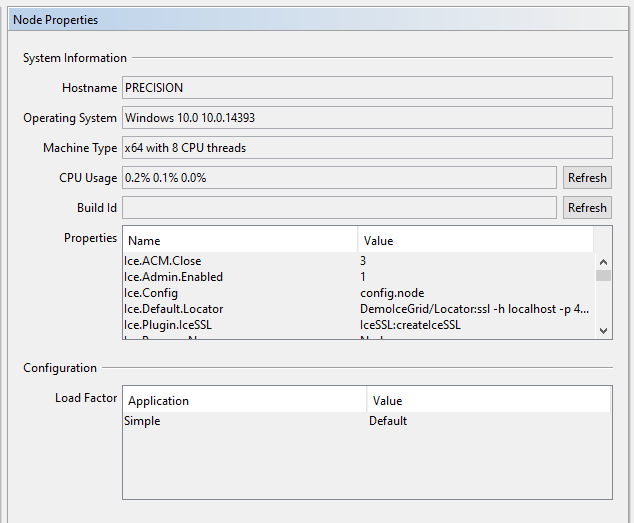
The Node Properties panel shows:
- Hostname The name of the host on which the IceGrid node process is running.
- Operating System The operating system name and version of the host on which the IceGrid node process is running.
- Machine Type The type of CPUs and the number of CPU threads of the host on which the IceGrid node process is running. For example, a computer with a dual-core CPU and 2 "hyper threads" per core will show 4 CPU threads.
- CPU Usage (Windows) or Load Average (Linux and macOS) On Windows, shows the percentage of CPU utilization in the past 1, 5, and 15 minutes. On Linux and macOS, shows the load-average in the past 1, 5 and 15 minutes. These values are retrieved when the Node Properties panel is displayed. Click on the Refresh button to retrieve the latest values.
- Build Id The build Id of this node: this corresponds to the Ice property BuildId.
- Properties A table showing all the Ice properties currently set in this IceGrid node.
- Load Factor Shows the load factor defined by each application using this node.
Children
An IceGrid node can only have the following types of children: