Registry Replication
9 min read
9 min read
9 min read
9 min read
9 min read
9 min read
9 min read
9 min read
9 min read
You can run several IceGrid registries as replicas, so that clients and nodes keep working when a registry or its host fails. A replicated registry consists of one master replica and any number of slave replicas. Every replica answers locate requests and can activate servers; changes to the registry's state, such as deploying an application, and client sessions require the master replica. Clients configured with several replicas fail over from one replica to another on their own.
When the master replica fails, the slave replicas keep providing their services, and no slave replica becomes the master on its own. To restore the services that require the master replica, you restart the master replica or promote a slave replica by restarting it as the master.
Registry replication does not replicate your servers. To keep a service available when its server fails, use object adapter replication.
Registry Replication Architecture
Each replica has a unique name. The name Master is reserved for the master replica.
The figure below shows a master replica and a slave replica, each running on a host with a node:
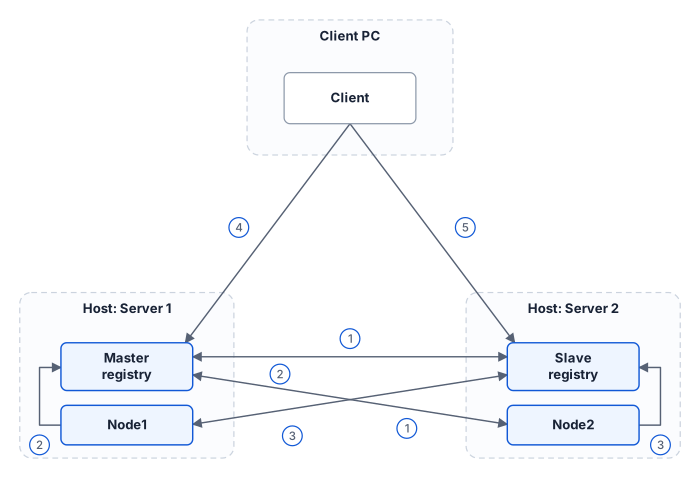
- The slave replica registers with the master replica at startup and copies the master's database: the deployed applications, the dynamically registered object adapters, and the well-known objects added through the
IceGrid::Admininterface. The master replica sends every later change to all active slave replicas. - The nodes register with the master replica at startup. A node reaches the master replica through any replica its locator lists: the master replica itself, or a slave replica that has synchronized with it.
- The master replica gives the nodes its list of slave replicas, and the nodes register with each of them. A replica can activate the servers of the nodes registered with it.
- The client's configuration determines which replica it contacts first. In the figure, the client contacts the master replica.
- When the master replica fails, the client fails over to the slave replica. The failure of the host Server 1 also takes down
Node1and its servers; the client reaches a server onNode2only if that server's object adapter is replicated.
A slave replica receives database updates only from the master replica.
Capabilities of a Registry Replica
A slave replica provides the following services whether or not the master replica is running. The services that require the master replica are unavailable until a master replica runs again.
| Service | Master replica | Slave replica |
|---|---|---|
Locate requests | Yes | Yes |
Server activation | Yes | Yes |
Queries for well-known objects | Yes | Yes |
Client sessions and resource allocation | Yes | No |
Dynamic registration of object adapters | Yes | Forwarded to the master replica |
Changes to applications and well-known objects, removal of dynamically registered adapters | Yes | No |
Other administrative operations | Yes | Yes |
Administrative sessions | Yes | Yes |
Locate Requests
Every replica answers locate requests. A slave replica resolves object identities, adapter IDs and replica group IDs into endpoints using its copy of the master's database.
Server Activation
A node registers with every active replica, so any replica can activate one of the node's servers on behalf of a client.
Queries
The replicas host a replicated well-known object, IceGrid/Query, that implements the IceGrid::Query interface used to query well-known objects. A client calls this object through the well-known proxy IceGrid/Query.
Client Sessions and Allocation
A client can create a client session only with the master replica, and therefore needs the master replica to allocate objects and servers.
Dynamic Registration
When IceGrid.Registry.DynamicRegistration is enabled, a server can register an object adapter that no deployed application describes. Only the master replica records such a registration: a slave replica forwards it to the master replica, so the registration requires a running master replica.
Administration
You administer an IceGrid registry through the IceGrid::Admin interface, directly or, more commonly, with an administrative tool that uses this interface. Only the master replica changes the registry's database: it adds, updates and removes applications and well-known objects, and removes dynamically registered adapters. A slave replica rejects these operations and accepts the other administrative operations, such as starting and stopping servers. The administrative tools let you select the replica to contact.
For programmatic access to a replica's administrative interface, the IceGrid/Registry identity corresponds to the master replica and the identity IceGrid/Registry-name corresponds to the slave replica with the given name.
The registry's locator object also implements IceGrid::Locator, which extends Ice::Locator with two operations: getLocalRegistry returns the Registry object of the replica your locator proxy is connected to, and getLocalQuery its Query object.
Glacier2 Support
A replica hosts the session manager objects that a Glacier2 router uses to create IceGrid sessions, as described in Glacier2 Integration with IceGrid. The master replica hosts the client session managers IceGrid/SessionManager and IceGrid/SSLSessionManager when you set IceGrid.Registry.SessionManager.Endpoints, and the administrative session managers IceGrid/AdminSessionManager and IceGrid/AdminSSLSessionManager when you set IceGrid.Registry.AdminSessionManager.Endpoints. A slave replica hosts only the administrative session managers, as IceGrid/AdminSessionManager-name and IceGrid/AdminSSLSessionManager-name.
Configuring Registry Replication
In the slave replicas, the clients and the nodes, configure Ice.Default.Locator with the endpoints of all the replicas: they then reach the registry as long as one of these replicas is running. The following sections describe what each of them uses this property for.
Instead of defining Ice.Default.Locator, you can configure the IceLocatorDiscovery plug-in in the slave replicas, the clients and the nodes, which then find the replicas at runtime. In a slave replica or a node, also set IceLocatorDiscovery.InstanceName or IceGrid.InstanceName to the instance name of the deployment.
Replicas
Each replica sets its name with IceGrid.Registry.ReplicaName. The default value of this property is Master, so the master replica can omit it.
A slave replica needs a default locator, set with Ice.Default.Locator or installed by IceLocatorDiscovery. At startup, the slave replica asks the replicas it reaches through this locator for the master replica's endpoints, then registers with the master replica to copy its database and obtain the list of active nodes.
The following properties configure a master replica:
IceGrid.Registry.Client.Endpoints=tcp -p 4061IceGrid.Registry.Server.Endpoints=tcpIceGrid.Registry.Internal.Endpoints=tcpIceGrid.Registry.LMDB.Path=db/master...The following properties configure a slave replica named Replica1:
Ice.Default.Locator=IceGrid/Locator:tcp -h server1 -p 4061:tcp -h server2 -p 4061IceGrid.Registry.Client.Endpoints=tcp -p 4061IceGrid.Registry.Server.Endpoints=tcpIceGrid.Registry.Internal.Endpoints=tcpIceGrid.Registry.LMDB.Path=db/replica1IceGrid.Registry.ReplicaName=Replica1...Clients
A client sends its locate requests to the replicas listed in Ice.Default.Locator. Listing several replicas lets the client fail over when a replica fails:
Ice.Default.Locator=IceGrid/Locator:tcp -h server1 -p 4061:tcp -h server2 -p 4061Nodes
A node registers with every active replica, so that each replica can activate the node's servers and knows the endpoints of their object adapters.
The node also copies its Ice.Default.Locator property into the configuration file of each server it activates, unless the server's descriptor sets this property. The servers of a node therefore reach the same replicas as the node.
At startup, the node registers with the master replica, which gives it the list of active slave replicas. When the master replica is not running, the node asks the replicas listed in Ice.Default.Locator for the list instead.
The following properties configure a node:
Ice.Default.Locator=IceGrid/Locator:tcp -h server1 -p 4061:tcp -h server2 -p 4061IceGrid.Node.Name=node1IceGrid.Node.Endpoints=tcpIceGrid.Node.Data=db/node1